Monitoring & Observability
Monitor your GateKey infrastructure with the built-in dashboard, Prometheus metrics, OpenTelemetry tracing, and audit logs.
Real-Time Dashboard

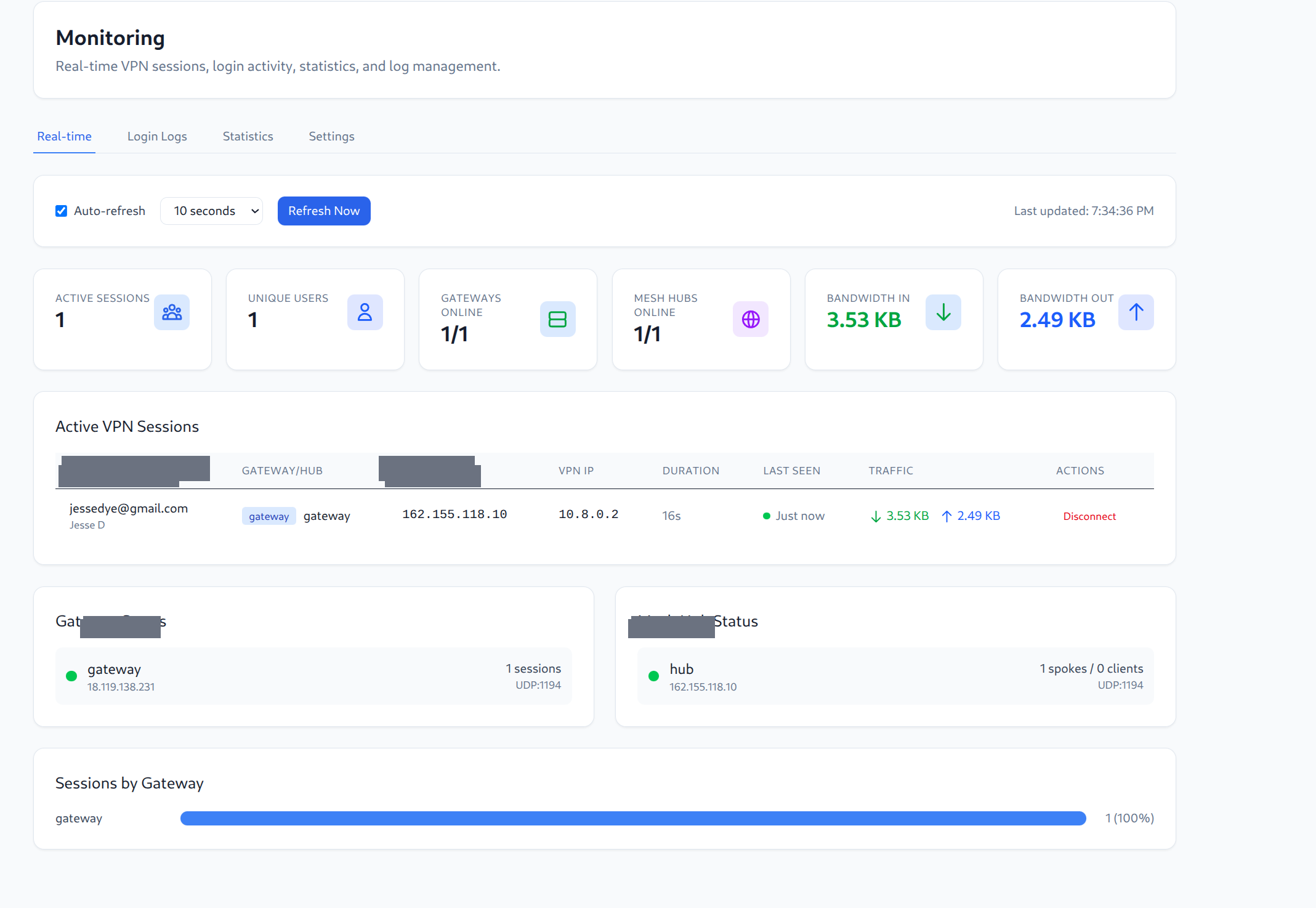
The monitoring page provides real-time visibility into your VPN infrastructure:
Key Metrics
- Active Sessions - Current number of connected VPN clients
- Unique Users - Number of distinct users connected
- Gateways Online - Health status of VPN gateways
- Mesh Hubs Online - Health status of mesh hubs
- Bandwidth In/Out - Real-time traffic statistics
Active VPN Sessions
View all currently connected users with:
- User identity (email)
- Gateway/Hub connection
- Client and VPN IP addresses
- Session duration
- Traffic statistics
- Ability to disconnect sessions
Gateway & Hub Status
Monitor the health of all gateways and mesh hubs with session counts and connection details.
Prometheus Metrics
GateKey exposes Prometheus-compatible metrics at the /metrics endpoint.
Accessing Metrics
curl https://gatekey.example.com/metrics
Available Metrics
HTTP Metrics
| Metric | Type | Labels | Description |
|---|---|---|---|
gatekey_http_requests_total | Counter | method, path, status | Total HTTP requests |
gatekey_http_request_duration_seconds | Histogram | method, path | Request latency distribution |
gatekey_http_requests_in_flight | Gauge | - | Current requests being processed |
Authentication Metrics
| Metric | Type | Labels | Description |
|---|---|---|---|
gatekey_auth_sessions_active | Gauge | - | Current active user sessions |
gatekey_auth_logins_total | Counter | provider, result | Login attempts (success/failure) |
PKI & Certificate Metrics
| Metric | Type | Labels | Description |
|---|---|---|---|
gatekey_certificates_issued_total | Counter | type | Certificates issued |
gatekey_certificates_revoked_total | Counter | - | Certificates revoked |
gatekey_ca_expiry_seconds | Gauge | - | Seconds until CA expiration |
Gateway Metrics
| Metric | Type | Labels | Description |
|---|---|---|---|
gatekey_gateway_connections_active | Gauge | gateway | Active gateway connections |
gatekey_gateway_heartbeats_total | Counter | gateway, status | Gateway heartbeat events |
Database Metrics
| Metric | Type | Labels | Description |
|---|---|---|---|
gatekey_db_connections_open | Gauge | - | Open database connections |
gatekey_db_connections_in_use | Gauge | - | Active database connections |
gatekey_db_connections_idle | Gauge | - | Idle database connections |
Policy Metrics
| Metric | Type | Labels | Description |
|---|---|---|---|
gatekey_policy_evaluations_total | Counter | result | Policy evaluations (allowed/denied) |
gatekey_policy_evaluation_duration_seconds | Histogram | - | Policy evaluation latency |
Server Info
| Metric | Type | Labels | Description |
|---|---|---|---|
gatekey_server_info | Gauge | version, go_version | Server version information |
Configuration
Enable metrics in server.yaml:
metrics:
enabled: true
path: "/metrics"
Prometheus Scrape Config
scrape_configs:
- job_name: 'gatekey'
static_configs:
- targets: ['gatekey.example.com:8080']
# For HTTPS with self-signed certs
scheme: https
tls_config:
insecure_skip_verify: true
Kubernetes ServiceMonitor
For Prometheus Operator, use a ServiceMonitor:
apiVersion: monitoring.coreos.com/v1
kind: ServiceMonitor
metadata:
name: gatekey-server
labels:
release: prometheus # Match your Prometheus selector
spec:
selector:
matchLabels:
app.kubernetes.io/name: gatekey
app.kubernetes.io/component: server
namespaceSelector:
matchNames:
- gatekey
endpoints:
- port: http
path: /metrics
interval: 30s
scrapeTimeout: 10s
OpenTelemetry Tracing
GateKey supports distributed tracing via OpenTelemetry, enabling end-to-end request visibility across your infrastructure.
Features
- Automatic span creation for all HTTP requests
- W3C Trace Context propagation for distributed tracing
- OTLP export via gRPC or HTTP
- Configurable sampling for production environments
- Rich span attributes including HTTP method, path, status, and user info
Configuration
Enable tracing in server.yaml:
telemetry:
enabled: true
service_name: "gatekey"
environment: "production"
otlp_endpoint: "otel-collector:4317"
otlp_protocol: "grpc" # or "http"
otlp_insecure: true # Set false for TLS
sample_rate: 1.0 # 1.0 = 100%, 0.1 = 10%
Configuration Options
| Option | Type | Default | Description |
|---|---|---|---|
enabled | bool | false | Enable OpenTelemetry tracing |
service_name | string | "gatekey" | Service name in traces |
service_version | string | - | Service version (auto-detected) |
environment | string | "production" | Deployment environment |
otlp_endpoint | string | - | OTLP collector endpoint |
otlp_protocol | string | "grpc" | Protocol: grpc or http |
otlp_insecure | bool | false | Skip TLS verification |
sample_rate | float | 1.0 | Trace sampling rate (0.0-1.0) |
Span Attributes
Each HTTP span includes:
http.method- Request method (GET, POST, etc.)http.url- Full request URLhttp.route- Matched route patternhttp.status_code- Response status codehttp.response_content_length- Response sizeuser_agent.original- Client user agentclient.address- Client IP addresserror- Set to true for 4xx/5xx responses
Example: Kubernetes with OTEL Collector
Deploy the OpenTelemetry Collector:
# otel-collector deployment
apiVersion: apps/v1
kind: Deployment
metadata:
name: otel-collector
spec:
template:
spec:
containers:
- name: collector
image: otel/opentelemetry-collector:latest
ports:
- containerPort: 4317 # OTLP gRPC
- containerPort: 4318 # OTLP HTTP
Configure GateKey to send traces:
telemetry:
enabled: true
service_name: "gatekey"
otlp_endpoint: "otel-collector.monitoring:4317"
otlp_protocol: "grpc"
otlp_insecure: true
Viewing Traces
Traces can be viewed in:
- Grafana Tempo - Native trace visualization
- Jaeger - Distributed tracing UI
- Zipkin - Trace analysis
- Datadog/New Relic/etc. - Via OTLP export
Audit Logs
All security-relevant events are logged:
- User authentication (success/failure)
- Config generation requests
- Gateway connection attempts
- Access denials with reasons
- Rule changes
- Admin actions
Viewing Audit Logs
In the web UI:
- Navigate to Administration > Audit Logs
- Filter by:
- Time range
- User
- Action type
- Gateway
Log Configuration
logging:
level: "info" # debug, info, warn, error
format: "json" # json or text
Alerting
Prometheus Alertmanager Rules
groups:
- name: gatekey
rules:
# High authentication failure rate
- alert: GatekeyAuthFailures
expr: rate(gatekey_auth_logins_total{result="failure"}[5m]) > 10
for: 5m
labels:
severity: warning
annotations:
summary: High auth failure rate
description: "{{ $value }} auth failures per second"
# Gateway offline
- alert: GatekeyGatewayDown
expr: gatekey_gateway_connections_active == 0
for: 2m
labels:
severity: critical
annotations:
summary: No active gateway connections
# High request latency
- alert: GatekeyHighLatency
expr: histogram_quantile(0.95, rate(gatekey_http_request_duration_seconds_bucket[5m])) > 1
for: 5m
labels:
severity: warning
annotations:
summary: High API latency (p95 > 1s)
# Database connection pool exhaustion
- alert: GatekeyDBPoolExhausted
expr: gatekey_db_connections_in_use / gatekey_db_connections_open > 0.9
for: 5m
labels:
severity: warning
annotations:
summary: Database connection pool nearly exhausted
Health Checks
HTTP Health Endpoints
# Liveness check
curl https://gatekey.example.com/health
# {"status": "ok", "timestamp": "2024-01-15T10:30:00Z"}
# Readiness check (includes database connectivity)
curl https://gatekey.example.com/ready
# {"status": "ready", "database": "connected"}
Kubernetes Probes
livenessProbe:
httpGet:
path: /health
port: 8080
initialDelaySeconds: 10
periodSeconds: 10
timeoutSeconds: 5
failureThreshold: 3
readinessProbe:
httpGet:
path: /ready
port: 8080
initialDelaySeconds: 5
periodSeconds: 5
timeoutSeconds: 3
failureThreshold: 3
Grafana Dashboards
Recommended Panels
- Request Rate -
rate(gatekey_http_requests_total[5m]) - Error Rate -
rate(gatekey_http_requests_total{status=~"5.."}[5m]) - Latency (p50/p95/p99) -
histogram_quantile(0.95, rate(gatekey_http_request_duration_seconds_bucket[5m])) - Active Sessions -
gatekey_auth_sessions_active - Gateway Health -
gatekey_gateway_connections_active - Database Pool -
gatekey_db_connections_open/gatekey_db_connections_in_use
Example Dashboard JSON
Import this dashboard into Grafana for quick setup:
{
"title": "GateKey Overview",
"panels": [
{
"title": "Request Rate",
"type": "graph",
"targets": [
{"expr": "rate(gatekey_http_requests_total[5m])"}
]
},
{
"title": "Active Sessions",
"type": "stat",
"targets": [
{"expr": "gatekey_auth_sessions_active"}
]
}
]
}